Passwords alone are no longer enough to keep your online accounts secure. Every day, cybercriminals use phishing attacks, credential theft, malware, and brute-force attacks to gain unauthorised access to personal and business accounts. Even a strong password can be compromised if it is stolen or reused across multiple websites. This is why Two-Factor Authentication (2FA) has become one of the most effective ways to improve online security. By requiring a second method of verification in addition to your password, 2FA significantly reduces the risk of unauthorised access and helps protect sensitive information from cyber threats. Whether you’re securing your email, online banking, social media accounts, or workplace applications, enabling 2FA is one of the simplest and most powerful cybersecurity practices you can adopt.
Table of Contents
What Is Two-Factor Authentication?
Two-Factor Authentication (2FA) is a security process that requires users to verify their identity using two different authentication factors before accessing an account or system. Instead of relying only on a password, users must provide a second form of verification, making it much more difficult for attackers to gain access even if they know the password.
Authentication factors generally fall into three categories:
- Something you know, such as a password or PIN.
- Something you have, such as a smartphone, hardware security key, or authentication app.
- Something you are, such as a fingerprint, facial recognition, or another biometric feature.
Using two of these factors creates an additional layer of protection that significantly improves account security.
Why Is 2FA Important?
Cyberattacks continue to increase across the world, targeting individuals, businesses, schools, and governments. Password theft is one of the most common methods used by cybercriminals. If a hacker steals your password through phishing, malware, or a data breach, they may be able to access your account immediately if no additional security measures are in place.
Two-Factor Authentication dramatically reduces this risk because attackers would also need access to your second authentication factor. This makes it much harder for cybercriminals to compromise your accounts.
Many organisations now require employees to use 2FA to protect sensitive business information, while major online platforms encourage users to enable it for personal accounts.
Learn more about online security:
- National Institute of Standards and Technology (NIST): https://www.nist.gov/
- Cybersecurity & Infrastructure Security Agency (CISA): https://www.cisa.gov/
- Cisco Networking Academy: https://www.netacad.com/
How Two-Factor Authentication Works
When you log into an account protected by 2FA, you first enter your username and password. After successfully entering your password, the system requests a second verification step. This could involve entering a one-time code sent to your phone, approving a login request in an authentication app, inserting a security key, or scanning your fingerprint.
Only after both verification steps are completed will access be granted. This additional step helps prevent unauthorised users from accessing your account.
Types of Authentication Factors
There are three primary authentication factors used in cybersecurity:
Knowledge Factors
These include passwords, PINs, or answers to security questions that only the user should know.
Possession Factors
These rely on devices you own, such as a mobile phone receiving a verification code, a hardware security token, or an authentication application like Microsoft Authenticator or Google Authenticator.
Inherence Factors
These use biometric information, including fingerprints, facial recognition, iris scans, or voice recognition, to verify a user’s identity.
10 Benefits of Using Two-Factor Authentication
1. Stronger Account Security
2FA provides an additional layer of protection beyond passwords.
2. Protection Against Password Theft
Even if your password is stolen, attackers still need your second authentication factor.
3. Reduced Risk of Phishing Attacks
Many phishing attacks become ineffective when accounts are protected by 2FA.
4. Better Protection for Financial Accounts
Banks and financial institutions commonly use 2FA to secure online banking services.
5. Enhanced Business Security
Businesses use 2FA to protect employee accounts and sensitive organisational data.
6. Improved Privacy
Additional verification helps keep personal information secure from unauthorised access.
7. Support for Remote Work
As more employees work remotely, 2FA strengthens access to company systems from different locations.
8. Compliance with Security Standards
Many organisations implement 2FA to meet cybersecurity regulations and industry best practices.
9. Increased User Confidence
Knowing that accounts have additional protection gives users greater confidence when accessing online services.
10. Easy to Enable
Most major online platforms offer free Two-Factor Authentication that can be activated in just a few minutes.
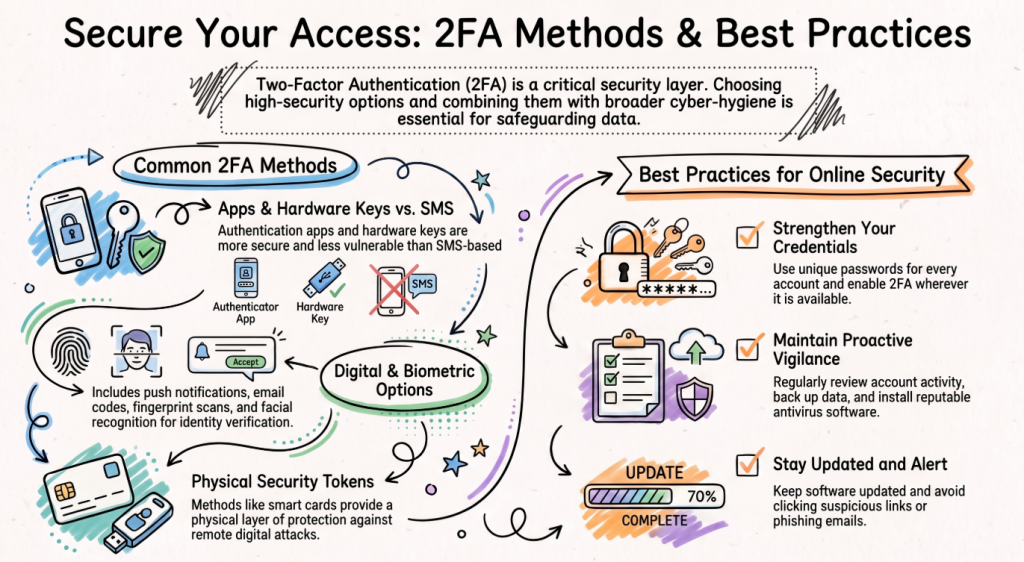
Common Two-Factor Authentication Methods
Several different 2FA methods are widely used today:
- SMS verification codes
- Authentication apps
- Hardware security keys
- Push notifications
- Fingerprint authentication
- Facial recognition
- Smart cards
- Email verification codes
Authentication apps and hardware security keys are generally considered more secure than SMS-based verification because they are less vulnerable to certain attacks.
Best Practices for Online Security
Two-Factor Authentication should be combined with other cybersecurity best practices:
- Use strong, unique passwords for every account.
- Enable 2FA wherever available.
- Keep software and devices updated.
- Avoid clicking suspicious links.
- Be cautious of phishing emails.
- Install reputable antivirus software.
- Regularly review account activity.
- Back up important data.
Following these practices greatly reduces your risk of becoming a victim of cybercrime.
Frequently Asked Questions
Is Two-Factor Authentication free?
Yes. Most online services, including email providers, social media platforms, and banks, offer 2FA at no additional cost.
Is 2FA completely secure?
While no security measure is perfect, Two-Factor Authentication significantly improves protection and makes it much more difficult for attackers to compromise your accounts.
Which 2FA method is the safest?
Authentication apps and hardware security keys are generally considered more secure than SMS verification because they are less susceptible to interception.
Should I enable 2FA on all my accounts?
Yes. It is recommended that you enable Two-Factor Authentication on email, banking, social media, cloud storage, and any account containing sensitive information.
Final Thoughts
Cybersecurity starts with protecting your digital identity, and Two-Factor Authentication (2FA) is one of the most effective tools available. By adding an extra verification step beyond your password, you greatly reduce the chances of unauthorised access and strengthen the security of your online accounts. Whether you are an individual protecting personal information or a business safeguarding sensitive data, enabling 2FA is a simple yet powerful step towards better cybersecurity.
If you’re interested in learning more about cybersecurity, ethical hacking, networking, and online security, preEminent Academy offers industry-recognised technology courses through Cisco Networking Academy to help you build practical skills for today’s digital world.
Learn more about our technology courses:
Website: https://www.preeminent.co.za/
Tech Courses: https://www.preeminent.co.za/tech-courses/
Follow us on Instagram: https://www.instagram.com/preeminent_academy/